Changelog (beta)
This page lists the Listary 7 beta releases. For Listary 6, see the V6 changelog.
Listary 7.1.0.45 Beta
- Listary V7 full changelog and roadmap: https://www.listary.com/v7
- Discussion: https://discussion.listary.com/t/10325
- Listary V7 中文完整更新日志与路线图:https://www.listary.net/v7
- 中文讨论:https://discussion.listary.com/t/10326
Improvements
- Clearer text: small text no longer looks blurry at 100% and 125% display scaling, especially Chinese.
- You can now hide the tray icon: turn off "Show tray icon" in Options > General.
- Ctrl+X now cuts files in the launcher and search bars too.
- In file dialogs, "Switch to Last Opened Folder in File Manager" now takes you to the folder you have open right now.
- With the dark theme, Listary's right-click menus are dark too (on Windows 11, confirmation dialogs are as well).
- File sizes use the decimal separator for your region.
Fixes
- Listary no longer needs the Visual C++ runtime installed separately. Before, it wouldn't start on computers without it.
- Fixed Ctrl+C, Ctrl+V and other shortcuts not working in text boxes with Caps Lock on, or with keyboards such as Russian or Hebrew.
- Fixed Ctrl+Insert, Shift+Insert and similar shortcuts not working in text boxes (they worked in 7.0).
- Fixed hotkeys changed in Options not working in the File Search Window.
- Fixed a black frame that sometimes appeared around the launcher.
- Fixed search results sometimes showing a file's old name after it was renamed.
- Fixed "Go to Parent Folder" going to the wrong place from a top-level folder.
- Fixed the eBay name showing incorrectly in web search.
- Fixed the tray icon not showing its name when you hover over it.
- Windows no longer shows "Unknown publisher" when you uninstall Listary.
Listary 7.1.0.43 Beta
- Listary V7 full changelog and roadmap: https://www.listary.com/v7
- Discussion: https://discussion.listary.com/t/10325
- Listary V7 中文完整更新日志与路线图:https://www.listary.net/v7
- 中文讨论:https://discussion.listary.com/t/10326
Major Improvements
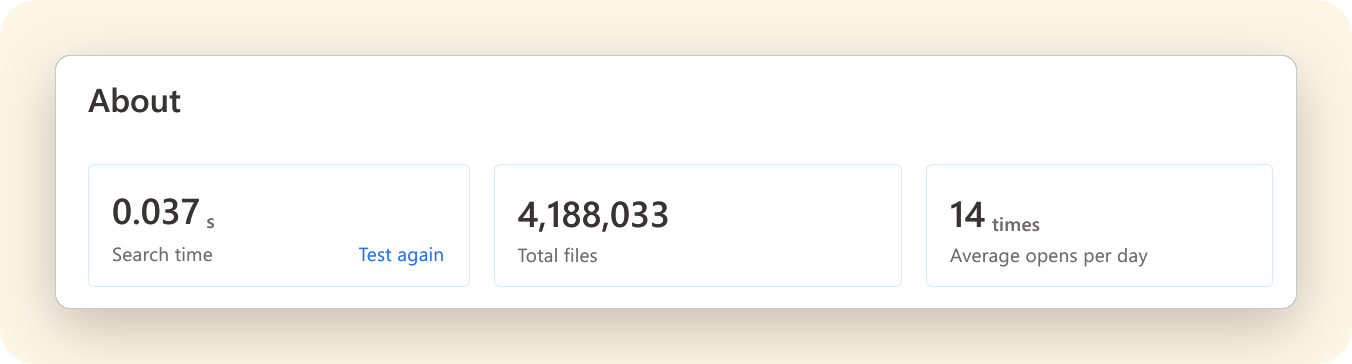
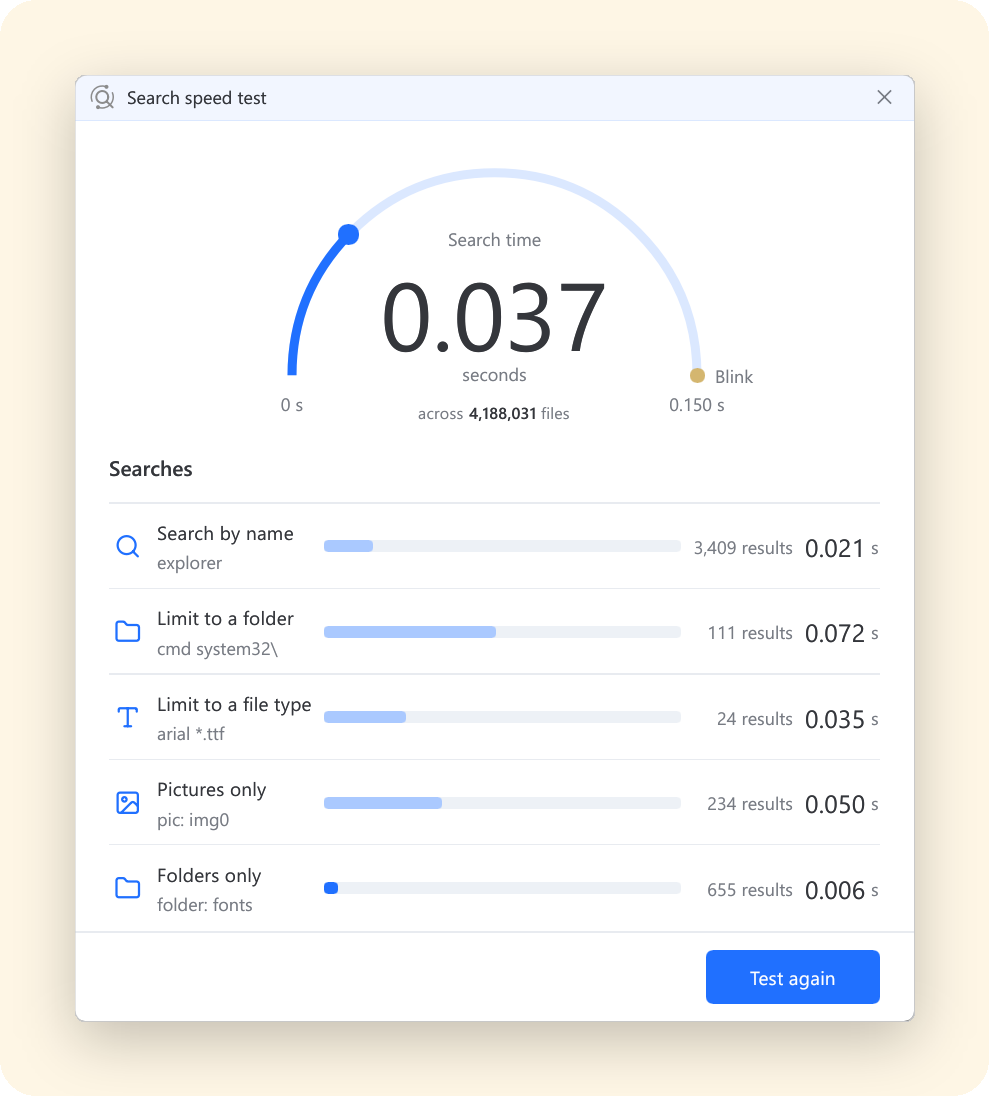
New About page: see your search time, total files and usage
Options > About shows how fast searches are on your computer, how many files you can search, and how many times a day you open Listary on average. You can also run a speed test to time five common searches.
About 50 MB less memory
Memory use is now 34% lower than in 7.0.
Korean initial-consonant search
Search Korean file names by typing only the initial consonant of each syllable. For example,
ㄱㅅfinds감사.txt.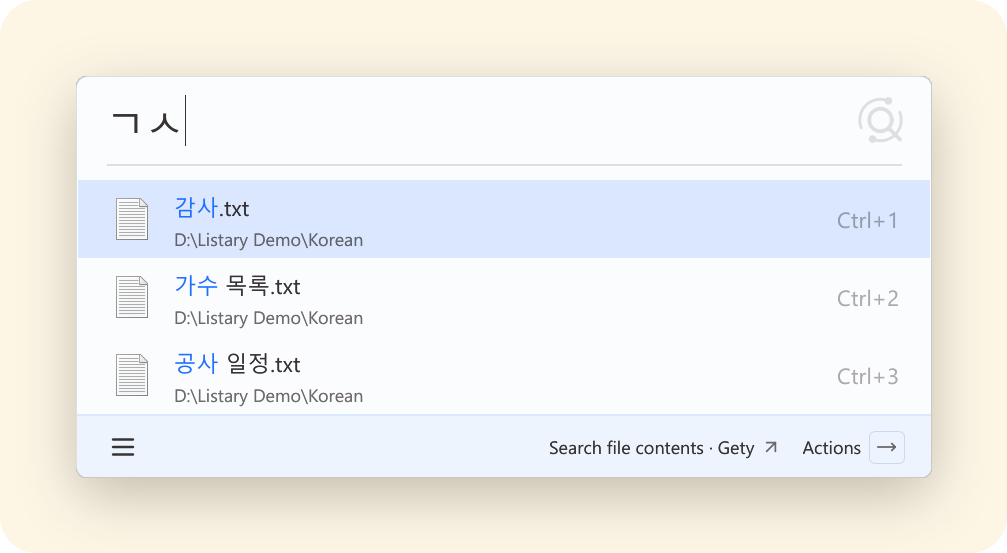
Other Improvements
- Multiple File Search Windows can be open at the same time, as in earlier versions.
- The Twitter web search is renamed to X, and its keyword is now
x. Custom keywords are kept. - Web search suggestions no longer flicker while typing.
- "Do not index" is renamed to "Exclude from search results". These files are still indexed, but don't appear in search results or count toward file totals.
- The Size column in the File Search Window shows large files in MB, GB or TB instead of KB.
- Quick Switch in the popup menu now only appears in file dialogs.
Fixes
- Fixed some behavior that differed from earlier versions (7.0).
- Fixed several issues with Quick Switch and the search bar in file dialogs:
- Ctrl+G now works without clicking Listary's search bar first in the extract dialogs of WinRAR, Bandizip and Explzh, and in WPS file dialogs.
- When a file dialog is near the bottom of the screen, the search bar now appears above the dialog instead of covering the taskbar.
- File Explorer windows and dialogs that were already open keep working with Listary after it restarts, for example after an update.
- Fixed "Copy as path" in the right-click menu of the launcher and File Search Window not working on Windows 11.
- Fixed "Disable for full-screen games and apps" not working in some games.
- Fixed a drive turned off in Options > File Search > Index turning back on if you clicked OK in Options while it was unplugged.
- Fixed some other minor bugs.
Listary 7.1.0.37 Beta
- Listary V7 full changelog and roadmap: https://www.listary.com/v7
- Discussion: https://discussion.listary.com/t/10325
- Listary V7 中文完整更新日志与路线图:https://www.listary.net/v7
- 中文讨论:https://discussion.listary.com/t/10326
Major Improvements
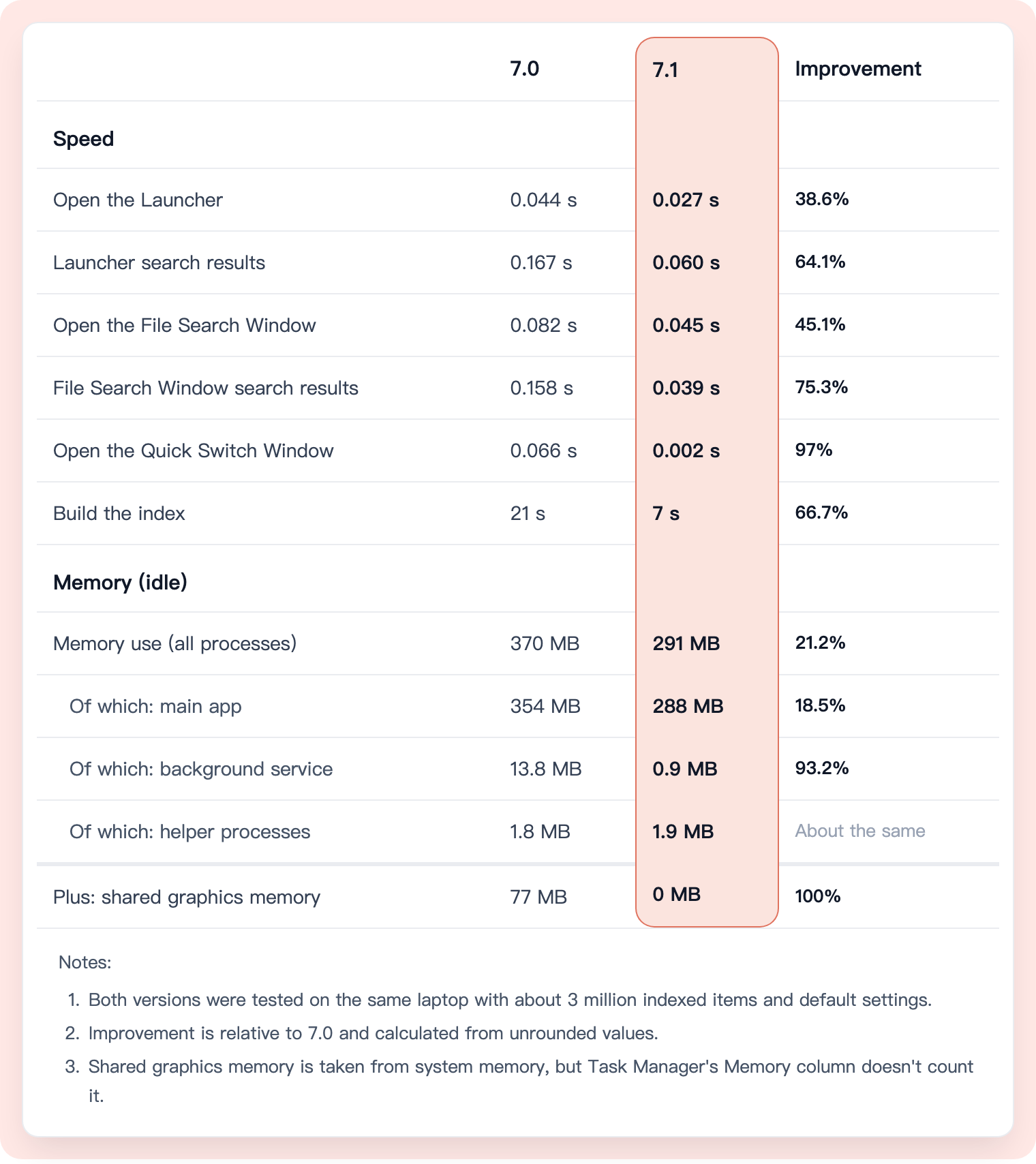
Rewritten in Rust: up to 4× faster, with 21% less memory
Listary 7.1 is an all-round upgrade, with indexing and search tuned to the limit. It opens, searches and builds its index faster, and uses less memory.
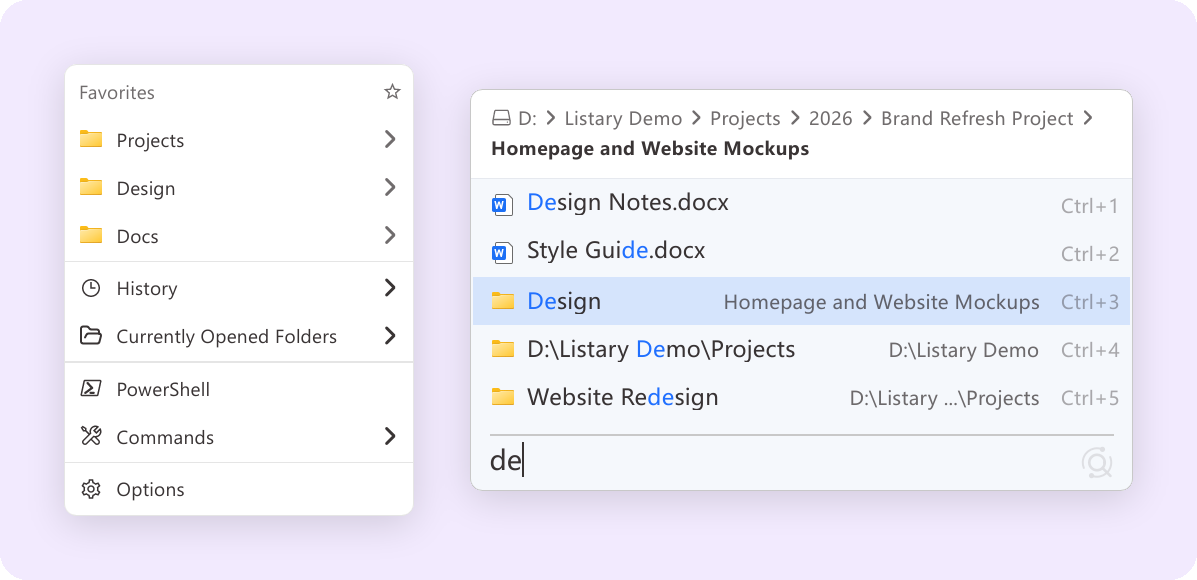
A finely tuned interface: better-looking menus and search bars
Menus have rounded corners and softer shadows. The search bars in File Explorer and file dialogs are drawn as one rounded card, and folder paths are shown level by level.
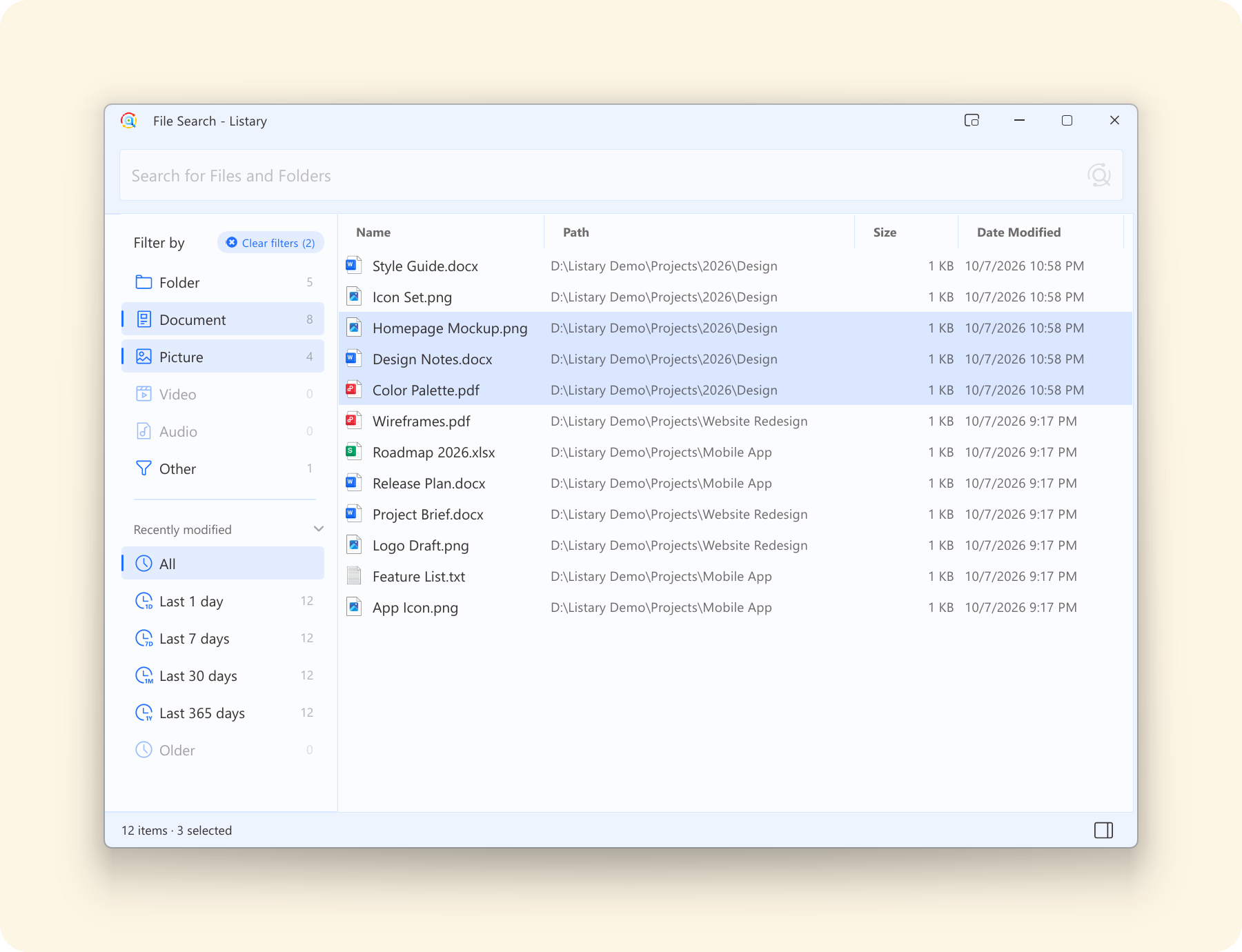
File Search Window: multi-select and more flexible filtering
Select several results to drag them together. In the sidebar, Ctrl+click to combine filters. Some hotkeys now also work in the File Search Window.
Other Improvements
- Search results are ranked more accurately: results whose names match better come first, and files you've opened before are no longer ranked ahead of them as a group. A result you picked before for the same search still comes first.
- The Diagnostic Tool (Options > About) now lists why a file can't be found and guides you through fixing it, so you no longer need to check the log.
- The Gmail, Twitter and Facebook web searches now search for what you type after the keyword. Previously they could only open the site's home page.
- Listary now shows a message when your settings can't be saved.
- Right-clicking in the File Search Window no longer freezes Listary while the Windows menu loads.
Fixes
- Fixed the first attempt to eject a USB drive failing because Listary was using it.
- Fixed a USB drive indexed as a whole keeping its old index after being pulled out without "Safely Remove" and plugged in again.
- Fixed a network or mounted drive (such as
Y:\) added as a custom folder getting an empty index, so none of its files could be found. - Fixed a damaged folder stopping the rest of the drive from being indexed.
- Fixed settings not being saved when Windows uses a non-Gregorian calendar.
- Fixed an error when changing the settings folder in a custom setup.
- Fixed the preview pane showing only an icon instead of the content when WPS or 32-bit Office is installed.
- Fixed icons and thumbnails in Listary going blank until a restart when the program that provides icons for a file type stopped responding.
- Fixed Rebuild and Update doing nothing while indexing was still in progress. They now run once the current indexing finishes.
- Fixed recent files and folders not being remembered in the Open and Save dialogs of new programs after Listary had been used in many programs.
- Fixed Listary clearing the command line in Total Commander 11.
- Fixed Quick Switch not working after switching to File Pilot.
- Fixed Listary preventing a laptop from switching between its discrete and integrated graphics.
- Fixed some other minor bugs.
What Works Differently
Known differences from earlier versions, some of which we'll keep improving in later versions:
- Only one File Search Window can be open at a time. Opening a new one, for example with its hotkey, closes the one already open.
- Automatic proxy scripts (PAC or WPAD) and SOCKS proxies aren't supported. Enter your proxy server in the Windows proxy settings instead.
- When you type in File Explorer or another file manager, Listary shows a search bar with results. The results list now always opens above the bar. Previously it opened below the bar when there wasn't enough room above.
- A hotkey can't be a key that types a character, such as Space on its own or Shift+A.
- Integration plugins you installed yourself no longer load. The official integrations are built in, and we'll introduce a more advanced integration system in the future.
- In the sidebar, you could select a preset and a file type together to see only that type of file in the preset (for example, the pictures in a preset). This is no longer possible. Instead, select the preset, then type a type keyword such as
pic:in the search box. - Dates and times in results follow Listary's interface language for now, not your Windows regional format.
- Listary 7.1 doesn't support Windows on ARM yet. If you're on an ARM PC, please don't upgrade for now. ARM support is coming soon.
Listary 7.0.0.9 Beta
- Listary V7 full changelog and roadmap: https://www.listary.com/v7
- Discussion: https://discussion.listary.com/t/10259
- Listary V7 中文完整更新日志与路线图:https://www.listary.net/v7
- 中文讨论:https://discussion.listary.com/t/10260
Major Improvements
Faster, more reliable file indexing
Reduced unnecessary repeated scans at startup and improved update speed for large folders. When network drives, removable drives, or file monitoring are temporarily unavailable, Listary now preserves existing search results where possible and recovers automatically.
More accurate search results
Fixed incorrect modified dates, file sizes, and folder types for some files, and improved matching accuracy for complex folder conditions.
More reliable Quick Switch in File Explorer
Improved how Quick Switch recognizes File Explorer, fixing cases where it could not switch folders in some windows, occasionally stopped working, or left behind stale state.
Better high-DPI and multi-monitor support
Fixed incorrect size and position when the File Search Window is first opened on displays with different scaling settings, and improved the clarity of text, icons, and borders in the Launcher.
Other Improvements
- Advanced search syntax now supports the full-width Chinese colon, such as
ext:pdf. - Recently visited folders are now deduplicated automatically, reducing repeated entries.
- Light and dark themes now follow the Windows app theme setting more accurately.
- Separator lines in the menu editor can now be deleted correctly.
- Improved borders, shadows, and other visual details in several windows.
Fixes
- Fixed Listary failing to start when certain settings folders are not writable, with clearer recovery guidance.
- Fixed startup failures in multi-user and Remote Desktop environments.
- Fixed occasional exits caused by errors in file associations, background tasks, and the local HTTP API.
- Fixed an additional error that could appear during exit after the File Search Window failed to initialize.
- Fixed the service failing to recover automatically after a temporary timeout.
- Fixed several issues that could cause indexes to be lost, search results to become outdated, or unnecessary background rescans.
Listary 7.0.0.7 Beta
Improvements
- Moved "Search this folder's contents with Gety" to the end of the action menu.
- Improved the stability of file search, indexing, and preview.
- Improved compatibility with special file names, long paths, and Pinyin search.
Fixes
- Fixed a crash that could occur when copying file paths.
- Fixed web links failing to open in some cases.
- Fixed Listary failing to start or exiting unexpectedly in some environments.
- Fixed several issues that could cause incorrect search results or index failures.
Listary 7.0.0.5 Beta
New: Category result counts in the File Search Window
The File Search Window now shows result counts for different file types and modification-time ranges. You can see how results are distributed before selecting one or more conditions to narrow them down.
- Select multiple file types, including documents, pictures, videos, and audio.
- Combine file types, modification times, and custom presets.
- Browse files by category without entering a search query.
- Clear all filters in one click to restore the complete result list.
New: Advanced search syntax
- Added extension filters such as
ext:pdfandext:pdf;docx. - Added
*.pdfas a quick way to filter by a specific format. - Added modified-date filters such as
date:today,date:week, anddate:2026-07. - Added file-size filters such as
size:>1gbandsize:10mb..1gb. - Added exact phrase matching with quotation marks, for example
"annual report". - Added exclusions for keywords, file types, and extensions with
-, for examplereport -draft -ext:tmp. - Multiple conditions can be freely combined, for example
doc: date:week -draft contract.
See the Listary v7 advanced search syntax documentation for the complete syntax, combination rules, and more examples.
Improvements
- Significantly improved input, refresh, and large-result-set browsing performance in the File Search Window.
- Improved file index startup, update, and persistence behavior.
- Improved the settings experience for file types and custom filters.
- Improved Chinese Pinyin search matching.
- Improved title bars in the File Search Window and Options window.
- Improved the tray menu in light, dark, and system themes.
- Improved the preview pane size, spacing, and window styling.
- Improved feature hints in the launcher footer.
- Improved accessibility support in the File Search result list.
- Added and refined localized interface text.
Fixes
- Fixed searches that could become slow or unresponsive, or fail to return results.
- Fixed result display issues when typing quickly or clearing the query.
- Fixed several stability issues during index recovery and background updates.
- Fixed some Chinese Pinyin queries that did not match correctly.
- Fixed preview pane display issues at certain screen positions and display scale settings.
- Fixed some interface elements not updating immediately after switching themes while Listary was running.
- Fixed related hints not updating after the preview hotkey was changed.
- Fixed several issues in file type and custom filter settings.
- Fixed interface styling issues in some dark-theme scenarios.